Security
How the app protects your keys, and the workflows that protect your servers.
1. How keys are stored
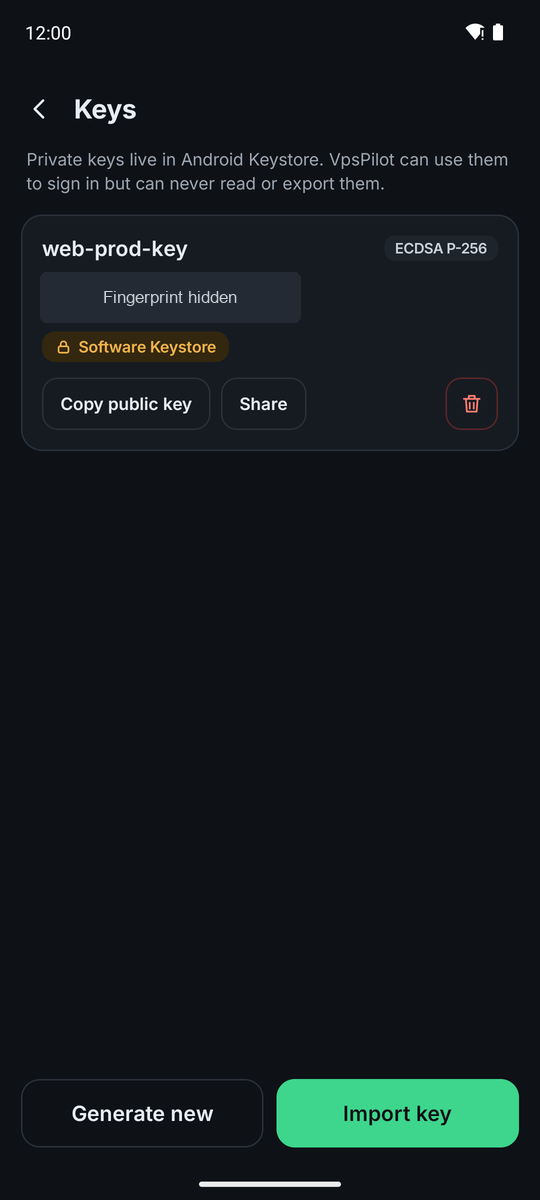
Keys you generate, and imported keys your phone supports, live in Android Keystore, and the app can use them but never read them. If the phone's Keystore can't hold an imported key, the card says Encrypted by Keystore: the key is stored encrypted, and the app decrypts it in memory briefly each time it signs. The app has no way to export a private key. Each key's card shows how it is protected: Security chip (StrongBox), Secure area (TEE), Software Keystore or Encrypted by Keystore, depending on what the phone offers.
A key can Require fingerprint/PIN. Settings → Security → Key unlock lasts sets how long it stays unlocked afterwards, for keys you create from then on. When you import a key, it is read once to move it into Keystore. A passphrase you type is used once and then wiped.
VpsPilot talks directly to your servers, to the Git hosts of accounts you add, and to Google Play for your subscription. It has no VpsPilot accounts, analytics or crash reporting, and app data is excluded from cloud backup. Servers' host keys are listed under Settings → Security → Known hosts, where you can forget one.
2. The security check
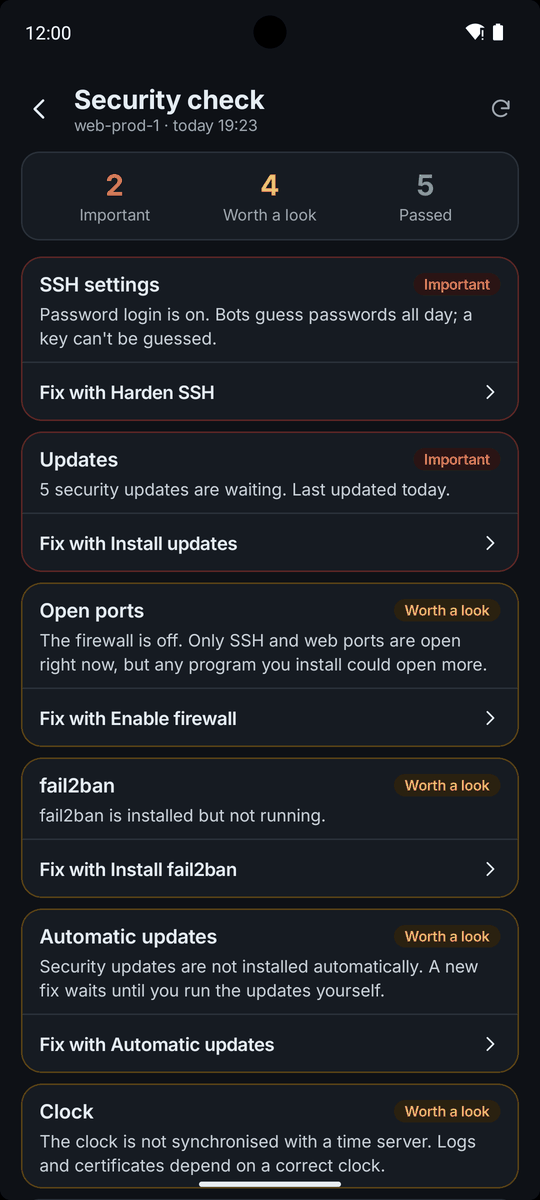
Security on the server's home screen runs the security check. It looks at SSH settings, open ports, updates, failed logins, fail2ban, automatic updates, accounts with root powers, accounts without a password, SELinux, whether a restart is needed, the clock and swap.
The check only reads. The one thing it writes is the package lists, so the update count is exact. When you open a server, the check also runs in the background if the last report is stale or over 24 hours old, which refreshes the package lists. Findings are sorted into Important and Worth a look, and some have a Fix with button that opens the workflow that solves them.
3. fail2ban
The Install fail2ban workflow blocks addresses that keep guessing SSH passwords. Tell it your SSH port; it does not change that port. Manage fail2ban then shows the jails and lets you turn a jail on or off, change the ban time (-1 bans for good), the find time and the number of tries, and edit the addresses that are never banned. Add the address I am connected from keeps you from locking yourself out.
Unban an IP address lets a blocked address in again, and Review logins shows current sessions, recent logins and failed attempts by address.
4. Firewall
Enable firewall blocks incoming traffic except SSH, web ports 80 and 443 if you ask for them, and anything your firewall already allows, which on Rocky Linux and AlmaLinux includes the default zone's services. Ports published by Docker can bypass the firewall rules. It uses UFW on Debian and Ubuntu and firewalld on Rocky Linux and AlmaLinux. The SSH port you enter, and every port sshd listens on, stay open. It asks for confirmation before it turns the firewall on. Check open ports shows what listens for outside connections and what the firewall says.
5. SSH hardening
Harden SSH turns off password logins and lets root log in only with a key. It first verifies that a key login works for your user, then validates the change with sshd -t and rolls it back if it does not validate. Keep the current connection open and test a new login before you close it. SSH keys shows which keys can log in on the server and lets you add or remove one.
6. Change the SSH port
Change the SSH port adds the new port next to the old one, so the old port keeps working while you test the new one. It checks that nothing else uses the port, labels it for SELinux where needed, opens it in the firewall, and makes sshd listen on it. Then it asks you to test a new connection on the new port from outside the server, for example by adding another server entry with that port. A provider's firewall can still block the new port.
Only then, and only if you turned on Remove the old port after I confirmed the new one works, does it remove the old port from sshd and the firewall. Then edit the saved server and set the new port. The workflow can't do it for you. If your provider has its own firewall, open the new port there as well.